使用Visual Studio可以创建.NET类库。笔者使用VS2022创建类库后将其用于MATLAB 2024a,创建类实例失败。所以,下面还是使用老机器上的VS2010打包类库。[大谦MATLAB,dqmatlab点com]
打开VS2010,新建VB.NET项目mypos,如图2-1所示选择“类库”选项,单击“确定”按钮。在属性页修改根命名空间为mypos。
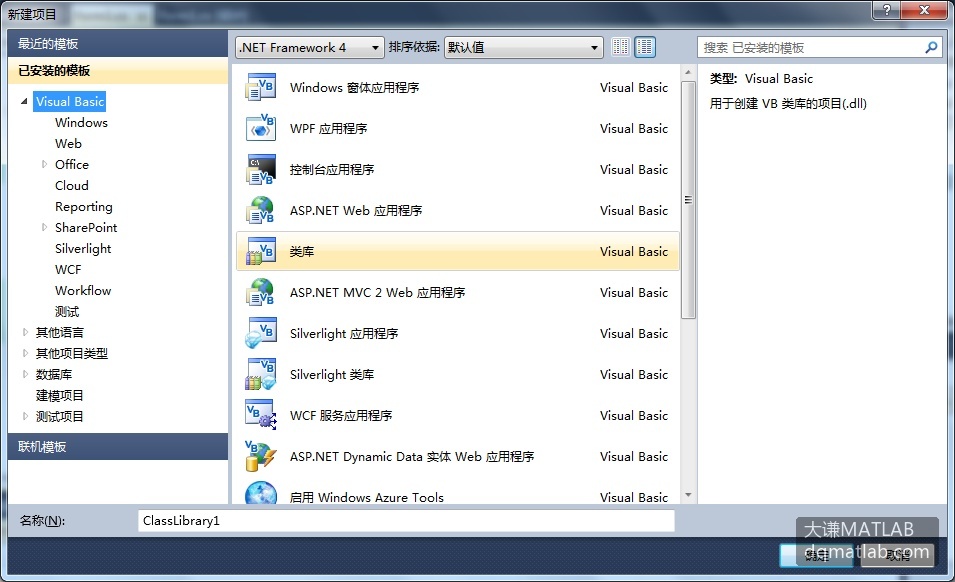
图2-1 创建类库
在代码编辑器中输入下面的VB.NET代码,创建一个Position类。该类有ID,x和y三个可读可写属性,描述点的编号、x坐标和y坐标。有一个只读属性Disto表示点与原点之间的距离。New方法提供不同形式的构造函数。重载方法Move计算平移点后的新坐标。MeTest方法输出点的当前坐标。
code.vb.net
Imports System.Math
Public Class Position
    '描述点的类
    Private m_x, m_y As Single    '记录点的横坐标和纵坐标
    Private m_ID As Integer    '点的编号
    Public Property ID() As Integer
        'ID属性表示点的编号
        Get
            Return m_ID
        End Get
        Set(ByVal newValue As Integer)
            m_ID=newValue
        End Set
    End Property
    Public Property x() As Single
        'x属性表示点的横坐标
        Get
            Return m_x
        End Get
        Set(ByVal newValue As Single)
            m_x=newValue
        End Set
    End Property
    Public Property y() As Single
        'y属性表示点的纵坐标
        Get
            Return m_y
        End Get
        Set(ByVal newValue As Single)
            m_y=newValue
        End Set
    End Property
    Public ReadOnly Property Disto() As Single
        'Disto为只读属性,返回点到原点的距离
        Get
            Return Sqrt(m_x * m_x + m_y * m_y)
        End Get
    End Property
    Public Sub New()
        '不带参数的构造函数
    End Sub
    Public Sub New(ByVal xx As Single, ByVal yy As Single)
        '构造函数,用给定的横坐标和纵坐标构造点
        m_x=xx
        m_y=yy
    End Sub
    Public Sub New(ByVal aPos As Position)
        '构造函数,用给定点构造新点
        With aPos
            m_x=.x
            m_y=.y
        End With
    End Sub
    Public Sub Move(ByVal deltaX As Single)
        '重载函数Move,计算沿横坐标平移后新的横坐标
        m_x += deltaX
    End Sub
    Public Sub Move(ByVal deltaX As Single, ByVal deltaY As Single)
        '重载函数Move,计算平移后的新坐标
        m_x += deltaX
        m_y += deltaY
    End Sub
    Public Sub MeTest()
        '输出当前点的横坐标和纵坐标
        Console.WriteLine("坐标为:{0},{1}", Me.x, Me.y)
    End Sub
End Class
保存项目后,用“生成”菜单中的选项“生成mypos…”生成类库mypos.dll。该文件位于项目保存路径下的mypos\bin\Debug子目录下。
也可以用VC#.NET创建类库。对应地新建VC#.NET项目,并添加下面的VC#.NET代码生成类库。
code.vc#.net
using System;
namespace Base
{
	/// <summary>
	/// Position 的摘要说明。
	/// </summary>
	public class Position
	{
        //描述点的类
		private float m_x;    //横坐标
		private float m_y;    //纵坐标
		private int m_ID;    //编号
		public int ID
		{
              //点的编号
			get{return m_ID;}
			set{m_ID=value;}
		}
		public float x
		{
              //点的横坐标
			get{return m_x;}
			set{m_x=value;}
		}
		public float y
		{
              //点的纵坐标
			get{return m_y;}
			set{m_y=value;}
		}
		public float Disto
		{
              //只读属性,点到原点的距离
			get{return checked((float)(Math.Sqrt(m_x * m_x + m_y * m_y)));}
		}
		public Position(){
              //不带参数的构造函数
		}
		public Position(float xx,float yy )
		{
              //构造函数,用给定的横坐标和纵坐标构造新点
			m_x=xx;
			m_y=yy;
		}
		public Position(Position aPos)
		{
              //构造函数,用给定点构造新点
			m_x =aPos.x;
			m_y =aPos.y;
		}
		public void Move(float deltaX )
		{
              //沿横坐标平移点
			m_x += deltaX;
		}
		public void Move(float deltaX, float deltaY)
		{
              //平移点
			m_x += deltaX;
			m_y += deltaY;
		}
		public void thisTest()
		{
              //输出点的坐标
			Console.WriteLine("坐标为:{0},{1}", this.x, this.y);
		}
	}
}