用MATLAB和Python合并多个表或DataFrame时,根据连接键连接的方式不同,有内连接(inner)、外连接(outer)、左连接(left)和右连接(right)等4种连接方式,它们对应的集合关系如图1-4所示。[大谦MATLAB,dqmatlab点com]
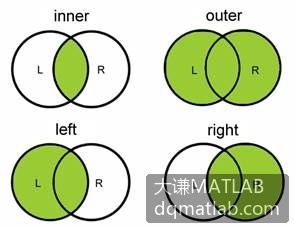
图1-4 各连接方式对应的集合关系
从图中可以看出,内连接是求两个对象的交,外连接是求它们的并,左连接是左表加上二者的交,右连接是右表加上二者的交。
MATLAB中可用join函数和innerjoin函数求两个表的内连接,即求它们的交。
下面先创建两个表,即T1和T2。
code.matlab
>> T1=table({'张三';'李四';'杨二';'王五'},[18;19;17;25], ...
    [162;169;164;167],[116;103;131;133],'VariableNames', ...
    {'Name' 'Age' 'Height' 'Weight'});
>> T2=table({'张三';'李四';'杨二';'王五';'苏云'}, ...
    {'M';'M';'M';'M';'F'},[0;0;0;1;0], ...
    'VariableNames',{'Name' 'Gender' 'Married'});
>> T1
T1 =
  4×4 table
      Name      Age    Height    Weight
    ________    ___    ______    ______
    {'张三'}    18      162       116
    {'李四'}    19      169       103
    {'杨二'}    17      164       131
    {'王五'}    25      167       133
>> T2
T2 =
  5×3 table
      Name      Gender    Married
    ________    ______    _______
    {'张三'}    {'M'}        0
    {'李四'}    {'M'}        0
    {'杨二'}    {'M'}        0
    {'王五'}    {'M'}        1
    {'苏云'}    {'F'}        0
用join函数默认时求表T1和T2的内连接。这里连接键为Name列,下面表T3中的4个名字在T1和T2中都有,将它们对应的数据合并到T3。
code.matlab
>> T3=join(T1,T2)
T3 =
  4×6 table
      Name      Age    Height    Weight    Gender    Married
    ________    ___    ______    ______    ______    _______
    {'张三'}    18      162       116      {'M'}        0
    {'李四'}    19      169       103      {'M'}        0
    {'杨二'}    17      164       131      {'M'}        0
    {'王五'}    25      167       133      {'M'}        1
使用innerjoin函数也可以求T1和T2的内连接。
code.matlab
>> T4=innerjoin(T1,T2)
T4 =
  4×6 table
      Name      Age    Height    Weight    Gender    Married
    ________    ___    ______    ______    ______    _______
    {'张三'}    18      162       116      {'M'}        0
    {'李四'}    19      169       103      {'M'}        0
    {'杨二'}    17      164       131      {'M'}        0
    {'王五'}    25      167       133      {'M'}        1
使用outerjoin函数默认时求T1和T2的外连接,即求它们的并集。并集中包含两个表中的全部数据,没有的数据用缺失值表示。
code.matlab
>> T5=outerjoin(T1,T2)
T5 =
  5×7 table
     Name_T1      Age    Height    Weight    Name_T2     Gender    Married
    __________    ___    ______    ______    ________    ______    _______
    {'张三'  }     18     162       116      {'张三'}     {'M'}        0
    {'李四'  }     19     169       103      {'李四'}     {'M'}        0
    {'杨二'  }     17     164       131      {'杨二'}     {'M'}        0
    {'王五'  }     25     167       133      {'王五'}     {'M'}        1
    {0×0 char}    NaN     NaN       NaN      {'苏云'}    {'F'}        0
给outerjoin函数的“type”参数指定不同的值,可以实现外连接、左连接和右连接。下面指定“type”参数的值为“full”,结果为外连接。
code.matlab
>> T6=outerjoin(T1,T2,'type','full')
T6 =
  5×7 table
     Name_T1      Age    Height    Weight    Name_T2     Gender    Married
    __________    ___    ______    ______    ________    ______    _______
    {'张三'  }     18     162       116      {'张三'}     {'M'}        0
    {'李四'  }     19     169       103      {'李四'}     {'M'}        0
    {'杨二'  }     17     164       131      {'杨二'}     {'M'}        0
    {'王五'  }     25     167       133      {'王五'}     {'M'}        1
    {0×0 char}    NaN     NaN       NaN      {'苏云'}    {'F'}        0
给outerjoin函数的“type”参数指定值为“left”,结果为左连接。左连接时左表不变,在左表的基础上加上两个表的交集。
code.matlab
>> T7=outerjoin(T1,T2,'type','left')
T7 =
  4×7 table
    Name_T1     Age    Height    Weight    Name_T2     Gender    Married
    ________    ___    ______    ______    ________    ______    _______
    {'张三'}    18      162       116      {'张三'}     {'M'}        0
    {'李四'}    19      169       103      {'李四'}     {'M'}        0
    {'杨二'}    17      164       131      {'杨二'}     {'M'}        0
    {'王五'}    25      167       133      {'王五'}     {'M'}        1
给outerjoin函数的“type”参数指定值为“right”,结果为右连接。右连接时右表不变,在右表的基础上加上两个表的交集。
code.matlab
>> T8=outerjoin(T1,T2,'type','right')
T8 =
  5×7 table
     Name_T1      Age    Height    Weight    Name_T2     Gender    Married
    __________    ___    ______    ______    ________    ______    _______
    {'张三'  }     18     162       116      {'张三'}     {'M'}        0
    {'李四'  }     19     169       103      {'李四'}     {'M'}        0
    {'杨二'  }     17     164       131      {'杨二'}     {'M'}        0
    {'王五'  }     25     167       133      {'王五'}     {'M'}        1
    {0×0 char}    NaN     NaN       NaN      {'苏云'}    {'F'}        0