MATLAB自动化的Execute方法可以在Excel,VB或任何支持VBA的程序中使用。Execute方法把一个命令字符串作为变量并返回一个字符串,其调用格式为:[大谦MATLAB,dqmatlab点com]
如果MATLAB为客户程序:
result=h.Execute('command')
result=Execute(h, 'command')
result=invoke(h, 'Execute', 'command')
如果VBA为客户程序:
[out] BSTR result=Execute([in] BSTR "command")
Execute函数在句柄h表示的自动化服务器中执行字符串command指定的MATLAB语句。服务器将输出返回到字符串result中,该字符串还可以包含任何警告或出错信息。
下面的例子在服务器中执行MATLAB的version函数,并将输出返回到MATLAB客户程序中。
MATLAB作为客户程序时,使用下面的命令行:
code.matlab
>> h=actxserver('matlab.application');
>> server_version=h.Execute('version')
server_version =
1.0.1.24704 (R14) Service Pack 1
VBA作为客户程序时,使用类似下面的语句行:
code.excel vba
Dim Matlab As Object
Dim server_version As text-blue-400">String
Set Matlab=text-blue-400">CreateObject("matlab.text-blue-400">application")
server_version=Matlab.Execute("version")
下面的例子用VBA调用MATLAB进行多项式拟合计算和绘图。首先在VBA环境中设计窗体,如图2-2所示。窗体中各控件的属性设置如表2-1中所示。
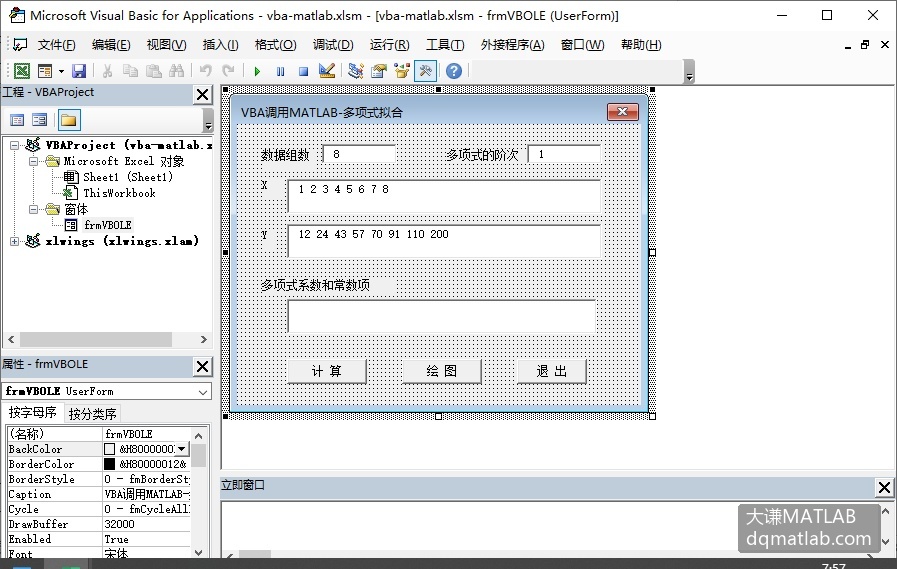
图2-2 设计对话框
表2-1 各控件的属性设置
| 对象类型 | Name属性 | Caption属性或Text属性 | 其他属性 |
|---|---|---|---|
| Form | frmVBOLE | Caption="VB调用MATLAB—多项式拟合" | |
| TextBox | Text1 | Text="8" | |
| TextBox | Text2 | Text="1" | |
| TextBox | Text3 | Text="1 2 3 4 5 6 7 8" | Mutiline=True ScrolBars=2 |
| TextBox | Text4 | Text="12 24 43 57 70 91 110 200" | Mutiline=True ScrolBars=2 |
| TextBox | Text5 | Text="" | Mutiline=True ScrolBars=2 |
| Label | Label1 | 数据组数 | |
| Label | Label2 | X | |
| Label | Label3 | Y | |
| Label | Label4 | 多项式系数和常数项 | |
| Label | Label5 | 多项式的阶次 | |
| CommandButton | Command1 | 计 算 | |
| CommandButton | Command2 | 绘 图 | |
| CommandButton | Command3 | 退 出 |
在窗体中输入下面的代码,利用VB前端界面中输入的数据参数,调用MATLAB进行计算和绘图。
code.excel vba
Option Explicit
'将MATLAB实例对象定义为公共变量
Public objMATLAB As Object
'定义一个实现计算或绘图的过程
Private Sub ComputeorPlot(CorP As Boolean)
  Dim intNum As Integer
  Dim intLevel As Integer
  Dim x(1 To 100) As Double
  Dim y(1 To 100) As Double
  Dim strModel As text-blue-400">String
  Dim i As Integer
  Dim strCommand As text-blue-400">String

  intNum=text-blue-400">Val(Text1.Text)
  intLevel=text-blue-400">Val(Text2.Text)
  Open App.Path + "/datX" For Output As 1
    Print #1, Text3
  Close 1
  Open App.Path + "/datY" For Output As 1
    Print #1, Text4
  Close 1
  Open App.Path + "/datX" For Input As 1
    For i=1 To intNum
        Input #1, x(i)
    Next i
  Close 1
  Open App.Path + "/datY" For Input As 1
    For i=1 To intNum
        Input #1, y(i)
    Next i
  Close 1

  '定义在MATLAB中要执行的命令
  strCommand="n=" & text-blue-400">Str(intLevel) & ";x=["
  For i=1 To intNum
    strCommand=strCommand & text-blue-400">Str(x(i)) & " "
  Next i
  strCommand=strCommand & "];y=["
  For i=1 To intNum
    strCommand=strCommand & text-blue-400">Str(y(i)) & " "
  Next i
  strCommand=strCommand & "];"
  If CorP Then
    strCommand=strCommand & "polyfit(x,y,n)"
    Text5=objMATLAB.execute(strCommand)
  Else
    strCommand=strCommand & "plot(x,y)"
    objMATLAB.execute (strCommand)
  End If

End Sub
'进行多项式拟合
Private Sub Command1_Click()
  Dim bolCorP As Boolean
  bolCorP=True
  Call ComputeorPlot(bolCorP)
End Sub
'进行绘图
Private Sub Command2_Click()
  Dim bolCorP As Boolean
  bolCorP=False
  Call ComputeorPlot(bolCorP)
End Sub
'退出程序
Private Sub Command3_Click()
  Set objMATLAB=Nothing
  Unload frmVBOLE
End Sub
Private Sub Form_initialize()
  '创建MATLAB的实例
  Set objMATLAB=text-blue-400">CreateObject("matlab.text-blue-400">application")
End Sub
运行程序,在各窗口中输入参数,单击“计算”按钮和“绘图”按钮,分别实现计算和绘图。如图2-3所示,利用缺省时给定的一套数据和参数,单击“计算”按钮时显示多项式的系数和常数项,于是可以得到多项式拟合模型。
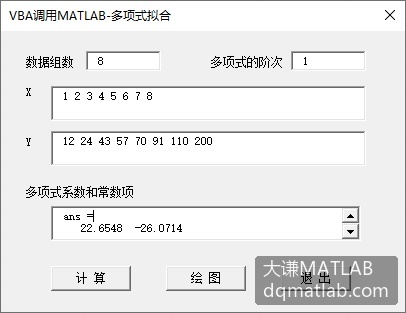
图2-3 运行结果
单击“绘图”按钮,在MATLAB图形窗口中绘制给定数据的线形图,如图2-4所示。
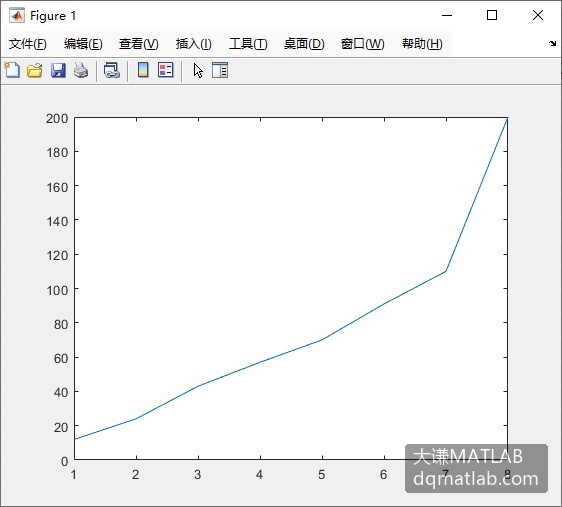
图2-4 线形图